
Cloud Fixed Asset Management Software
Track your capital assets, from computers to heavy industrial equipment, throughout their lifecycle. Automate maintenance, depreciation, and transfers between locations with smart alerts ensuring optimal performance.
Schedule A Demo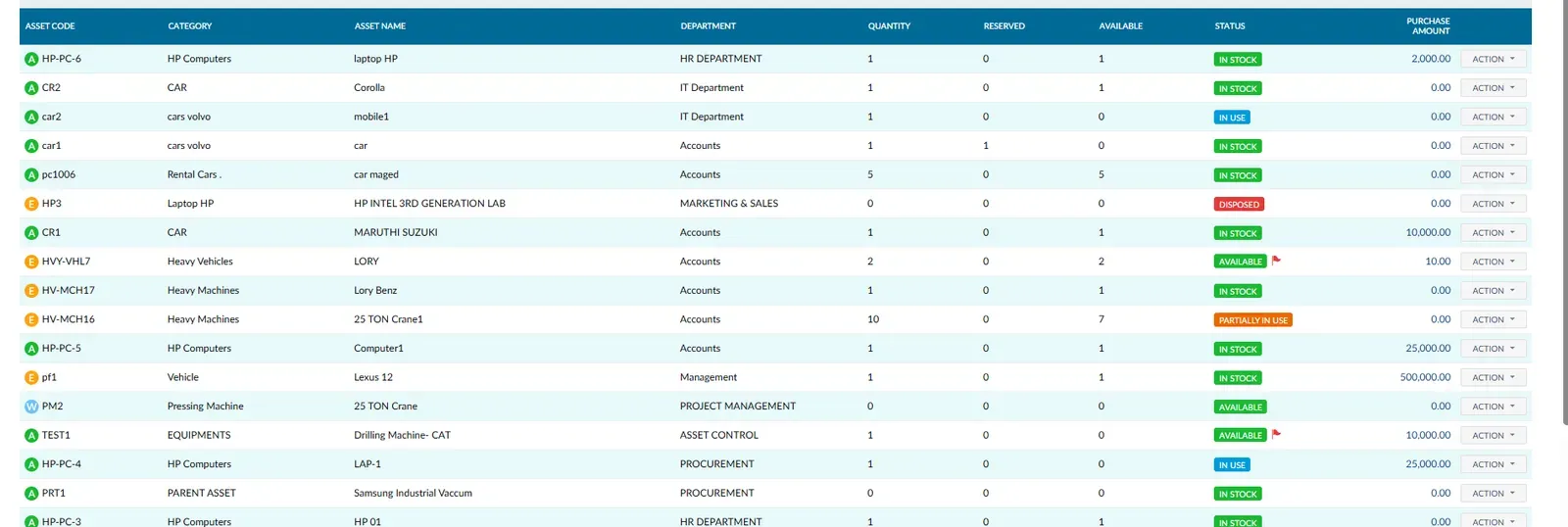
Asset
Get a complete view of every asset your organization owns in one place. Track each asset by its unique code, category, name, assigned department, quantity, status, and purchase amount. From laptops to heavy machinery, everything is organized and instantly searchable.
- Unique asset code with automatic classification
- Track available, reserved, and total quantities
- Clear statuses: In Stock, In Use, Available, Disposed
- Link each asset directly to its responsible department
Transfer
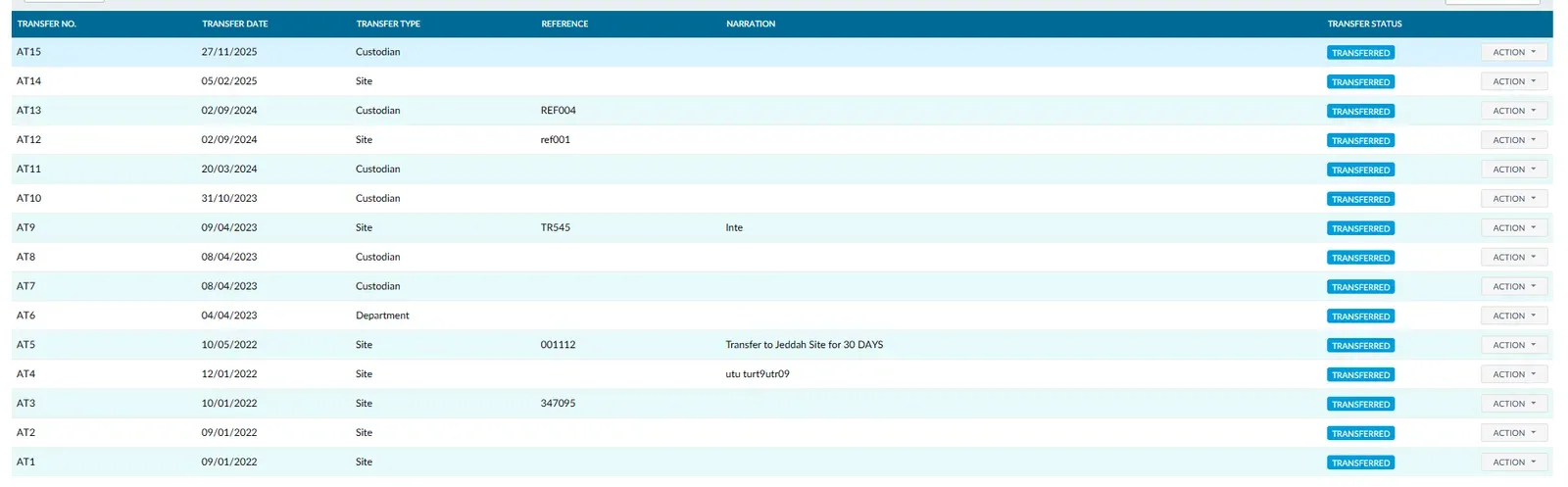
Equipment often needs to move between sites, departments, or custodians. Tranquil lets you record every transfer with its date, type, and reference, tracking status to ensure nothing gets lost in transit.
- Site transfers: move equipment between branches with full audit trail
- Department transfers: reassign assets from HR to Accounts, for example
- Custodian transfers: hand over equipment to a new employee with formal documentation
- Track every transfer status until completion
AssetTransaction
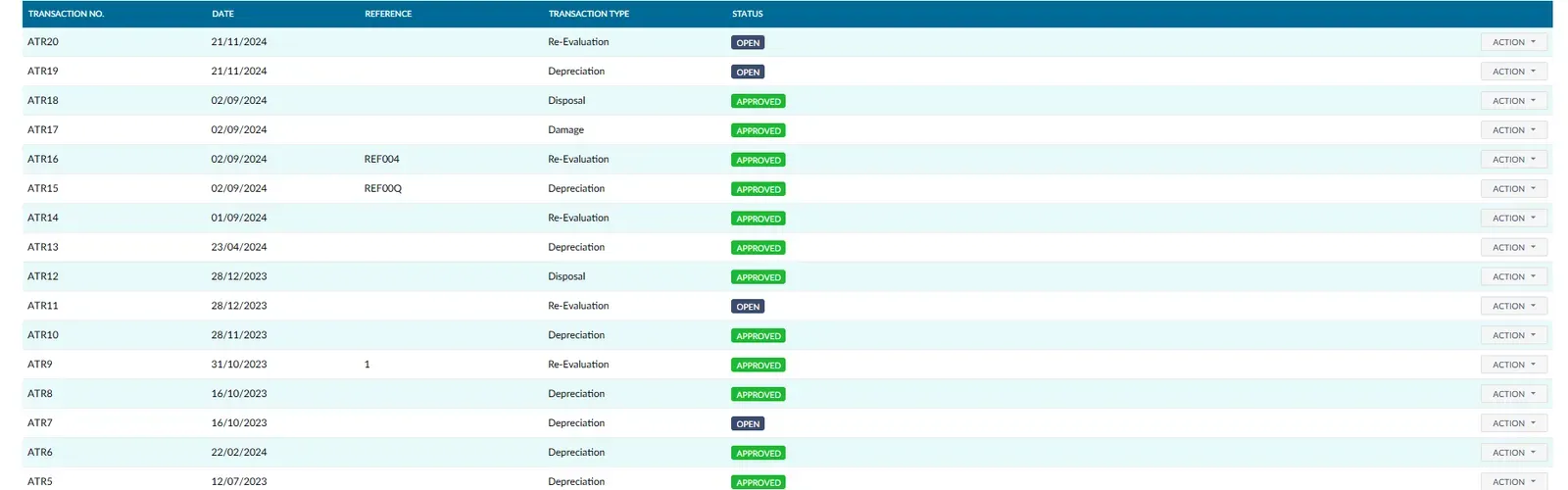
Monitor each asset throughout its entire lifecycle, from purchase to disposal. Every transaction is recorded with its date, reference, type, and approval status, whether it's depreciation, re-evaluation, damage, or sale.
- Purchase: automatically record details of newly acquired assets
- Depreciation: automatic calculation based on accounting standards
- Re-Evaluation: update book value when market conditions change
- Disposal: document asset sales or write-offs with complete records
AssetCategory
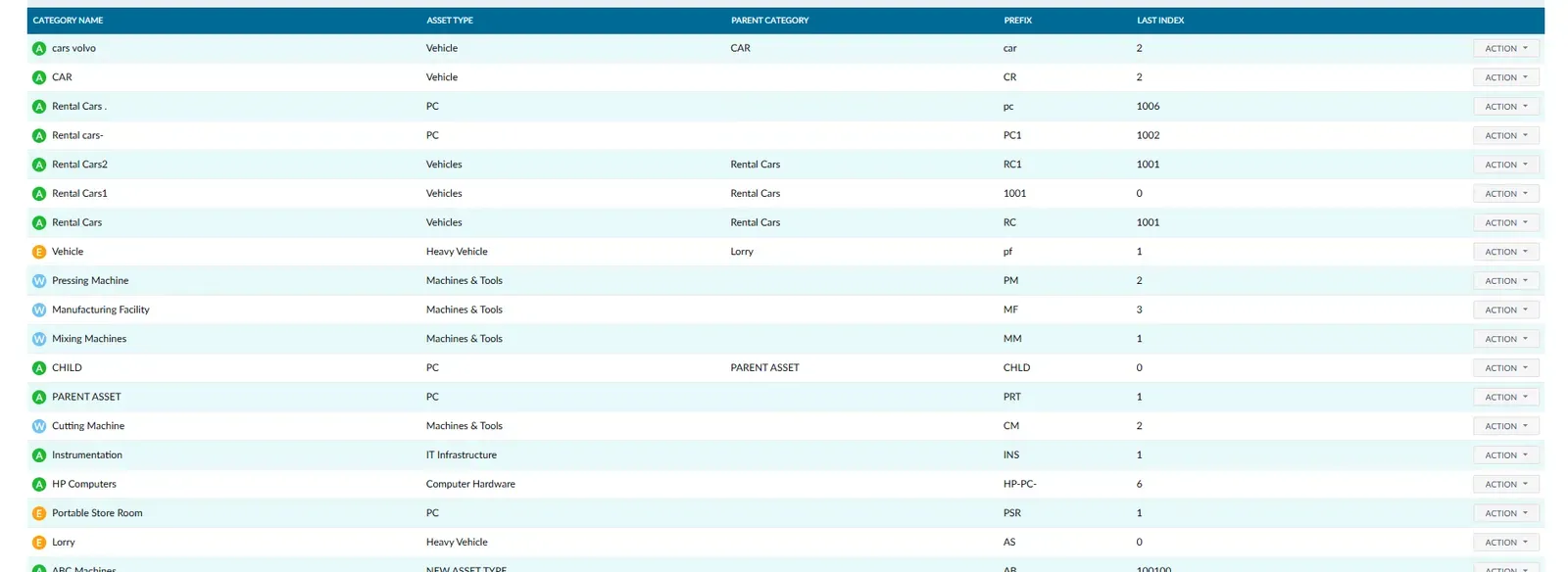
Organize your assets into hierarchical categories and types that mirror your organization's structure. Each category is linked to an asset type and parent category, with automatic prefix numbering for easy identification and search.
- Tangible categories: vehicles, computers, machines & tools
- Intangible categories: licenses, patents, trademarks
- Hierarchical structure: sub-categories under parent categories
- Automatic prefix numbering for each category
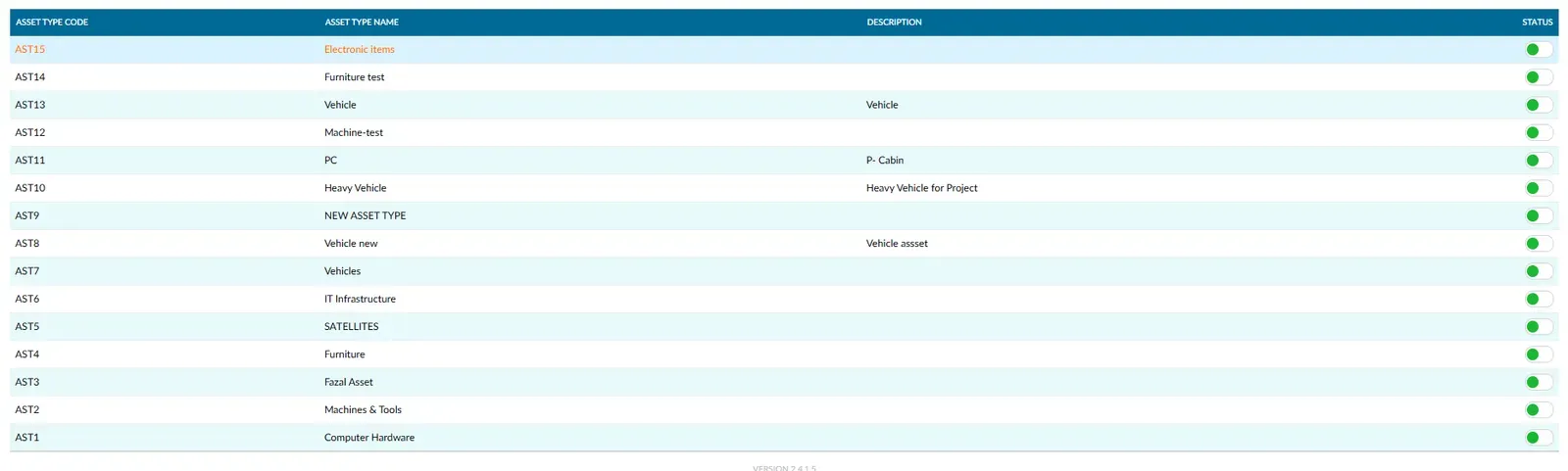
AssetType
Divide your tangible assets into distinct types for easier management and maintenance. Each type has its own code, description, and activation status, enabling precise organization even with thousands of assets.
- Electronic equipment: laptops, printers, networking devices
- Production equipment: machinery, molds, mixers, cutting machines
- Vehicles: cars, heavy trucks, transport equipment
- Infrastructure: servers, HVAC systems, office furniture
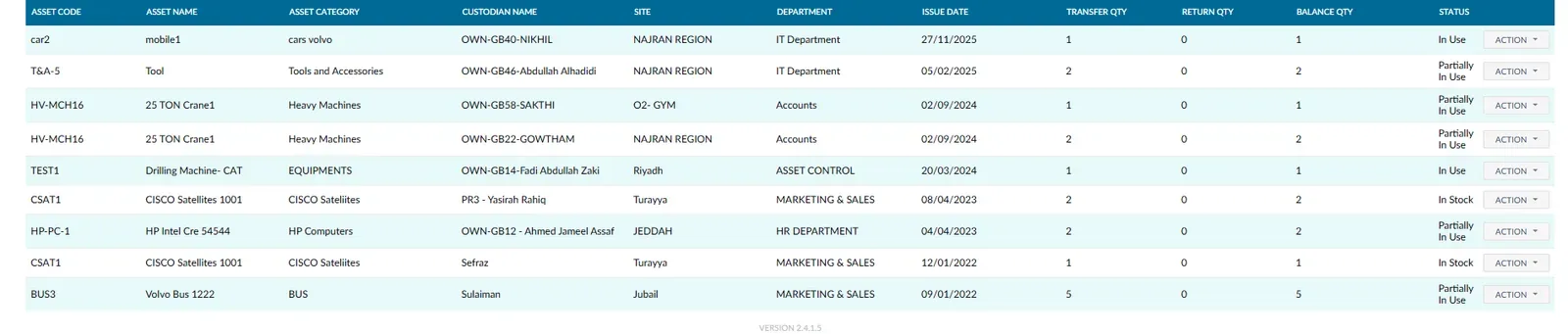
AssetStatus
Track every asset from the moment it's received until it leaves service. Know where each asset is located, who holds it, and how many times it's been transferred or returned, all in a single screen.
- Track current custodian and physical location of each asset
- View transfer count, return count, and remaining balance
- Clear statuses: In Use, In Stock, Partially In Use
- Scheduled maintenance alerts to extend asset lifespan
AssetRequest
Enable employees to request the assets they need through an organized request system. Each request follows a clear approval workflow, from submission to manager approval to delivery, with full tracking of every request status.
- Unified request form for all asset types
- Multi-level approval workflow based on company policy
- Automatic notifications when request status updates
- Approved requests automatically linked to transfer process
What does the software do?
Tranquil fixed asset management software brings together asset records, purchase values, categories, locations, custodians and status. It includes transfers, asset transactions, employee requests, depreciation, classification and maintenance alerts. Assets differ from items held for sale: equipment needs a history of use, movement, valuation and retirement, not just a stock quantity.
These records help managers review availability and equipment assigned to employees or sites, with references for recorded movements. A register alone cannot prevent loss or damage; handovers must be documented and physical condition reviewed. Recorded value reflects configured policies and transactions, not an independent market valuation.
How does the workflow work?
Begin with an asset register defining codes, categories, types, locations and custodians, then review purchase details and condition. Use an employee asset request and approval workflow before handover. Record a transfer when equipment changes location, department or custodian so the register reflects who holds it.
During operation, review maintenance alerts and depreciation, damage or revaluation transactions. When an asset is sold or retired, record disposal and review its financial effect. Bring examples of an asset transferred several times and one with an opening value to clarify the data and review process needed by your team.
Who is it for?
Trading and distribution businesses can track equipment and vehicles between branches. Contractors need records of equipment movements and custody at sites, while manufacturers review production equipment and its condition. These examples cover tangible assets; intangible categories such as licences can also be organised around company records.
Identify who requests equipment, approves allocation and confirms handover or return. Shared records are useful when staff document physical changes instead of relying on verbal updates. Discuss specialised maintenance requirements in the demo rather than assuming that alerts cover every technical maintenance procedure.
Using the software in Saudi Arabia
Arabic and English working environments are available, with asset values and transactions linked to accounting in SAR according to company settings. Depreciation and accounting policies need finance review. An asset screen does not replace original purchase documents or review of the related VAT treatment.
Connecting Tranquil modules
Asset acquisition can connect with purchasing and accounting, while assigned equipment relates to employee records. Discuss project allocation according to the modules in use. Shared asset, custodian and location definitions prevent different teams creating conflicting equipment records. Trace an example from purchase through transfer to depreciation or disposal to assess the complete workflow.
Request a Free Quote
We would be happy to show you our software and help you determine if Tranquil ERP is right for your business.
Contact UsFrequently Asked Questions
Can I track transfers between locations and departments?
Yes. Record transfers between sites, departments and custodians with references, dates and status.
Is depreciation included?
Yes. Depreciation is included in asset transactions. Review policies, values and configuration with finance during implementation.
Can employees request equipment?
Yes. Asset requests follow approval before delivery, with status tracking.
Are maintenance alerts available?
Yes. Scheduled maintenance alerts are included. Confirm the scope required for your equipment.
How do I record sale or damage?
Asset transactions include damage, disposal and revaluation. Review supporting documents and financial effects before approval.
How do assets differ from inventory?
Inventory tracks quantities of traded items; assets track ownership, use, custody, value and equipment lifecycle.