
Customer Management Software
Manage all your customer data from a single dashboard with instant access to transaction history, registration status, and credit limits. Strengthen customer relationships by managing multiple addresses, documents, and attachments in a unified profile for each client.
Schedule A Demo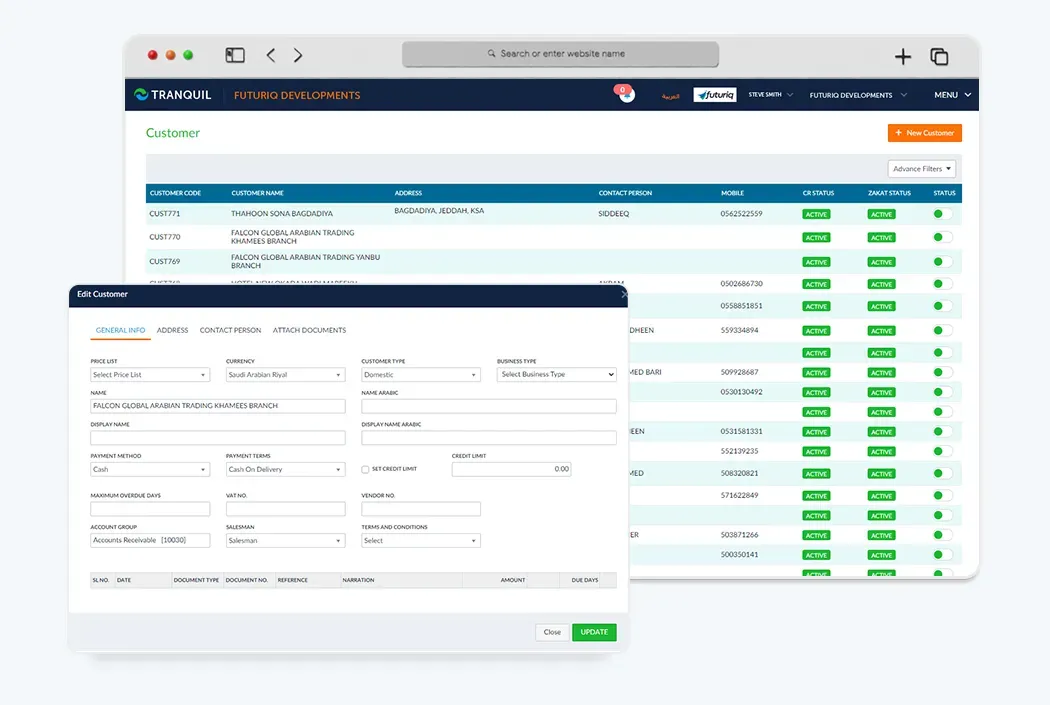
Customer Management
Easily manage your customers with the Tranquil sales order management software dashboard and get instant access to detailed customer information, including history of their engagement with your company.
Expiration Status
You also get live status on the dashboard regarding the expiration information of the customer's company registration and the Zakath registration.
Transaction History
Instant access to complete transaction and order history for each customer to understand buying patterns and improve service.
Credit Management
Set credit limits for customers and monitor their outstanding balances and track overdue payments.
Multiple Addresses
Manage multiple shipping and billing addresses for each customer with tracking of different locations and branches.
Documents & Attachments
Attach documents, contracts, and important files to each customer's profile for easy reference.
What does the software do?
Tranquil customer management software provides a shared profile for customer information, transaction history, credit limits, addresses and documents. Existing functions include registration expiry status, previous orders, outstanding balances, multiple billing and delivery addresses, and attachments. Sales and accounting can use the same customer details when preparing orders or reviewing receivables instead of creating conflicting files.
The customer relationship management scope on this page focuses on records, transactions and credit. It does not imply that every marketing, call-centre or sales-automation tool found in other CRM products is included. Bring specialised requirements to the evaluation. Customer history supports an informed review but does not guarantee increased sales or collection of every overdue balance.
How does the workflow work?
Begin by reviewing customer details and selecting one shared record, then add addresses, documents and relevant registration expiry dates. Set terms and credit limits according to company policy. When preparing a sales order, check the delivery and billing addresses and the information used on the document.
During follow-up, review previous orders, outstanding balances and overdue payments before deciding on a new transaction. Attach important documents so responsible staff can consult them. When an address or registration changes, update the record after checking its source. A shared profile still needs a policy defining who updates data and who reviews credit limits.
Who is it for?
Trading and distribution teams benefit from multiple delivery addresses and order history when customers buy repeatedly or receive goods at different branches. Contractors and service businesses can consult customer documents when preparing proposals or invoices. Manufacturers can use the same records in their product sales workflow.
Prepare one customer with several addresses and another with an outstanding balance and a document requiring an update. Test how staff find information and what they review before a new order. Such cases define customer data management needs more precisely than the CRM label alone and identify the modules needed for the sales cycle.
What should you review before choosing software?
Before selecting customer management software, review how the same customer orders through branches or receives deliveries at several addresses. Decide which shared record is used and who checks billing changes. Test a customer with an overdue balance, a new delivery request and an attached contract. History supplies information; authorised staff still make credit decisions. Review duplicate records and outdated documents before transferring data, using a small customer sample to test the sales cycle first.
Using the software in Saudi Arabia
Arabic and English interfaces are available. Customer records include registration information and documents described in the existing features. Balances and invoices relate to accounting, where SAR, VAT and e-invoicing follow applicable configuration and requirements. Registration expiry status does not mean the software verifies every document with its issuer or renews it automatically.
Review customer names, billing addresses, tax details and attachments before using them on financial documents. Incomplete information may require follow-up with the customer. Discuss invoicing scope during implementation rather than assigning all compliance obligations to the customer-record module.
Connecting Tranquil modules
Customer records connect to orders and sales documents, accounting for receivables and payments, and inventory and warehouses during fulfilment. Discuss customer-to-project relationships when using project management. Start with a single customer definition so teams use consistent information.
Ask for a demonstration from customer profile to sales order, invoice and balance review. Discuss a new delivery address or a credit limit needing attention. This sequence tests customer and sales management as one workflow without assuming automatic order blocking, alerts or communication tools whose scope has not been confirmed.
Request a Free Quote
We would be happy to show you our software and help you determine if Tranquil ERP is right for your business.
Contact UsFrequently Asked Questions
What information can I keep for a customer?
Profiles include transaction history, addresses, credit limits and documents. Define the information your team needs during setup.
Can a customer have multiple addresses?
Yes. Multiple shipping and billing addresses are supported. Check the correct address when preparing sales or delivery documents.
Can I set customer credit limits?
Yes. Set credit limits and review outstanding balances. Confirm approval settings rather than assuming automatic order blocking.
Can I view previous orders?
Yes. Customer transaction and order history supports review before a new order.
Can I attach contracts and documents?
Yes. Attach important files to the customer record for reference. The responsible team still needs to check validity and updates.
Does this include every CRM marketing tool?
No such assumption is made. Listed functions focus on customer data, transactions and credit; discuss specialised marketing requirements in the demo.