
Cloud Warehouse Management Software
Manage multiple warehouses and branches from a single platform with inter-location stock transfers and automatic value adjustments. Perform full or partial stock takes quickly using a compatible scanner, and track your inventory precisely from anywhere, anytime.
Schedule A Demo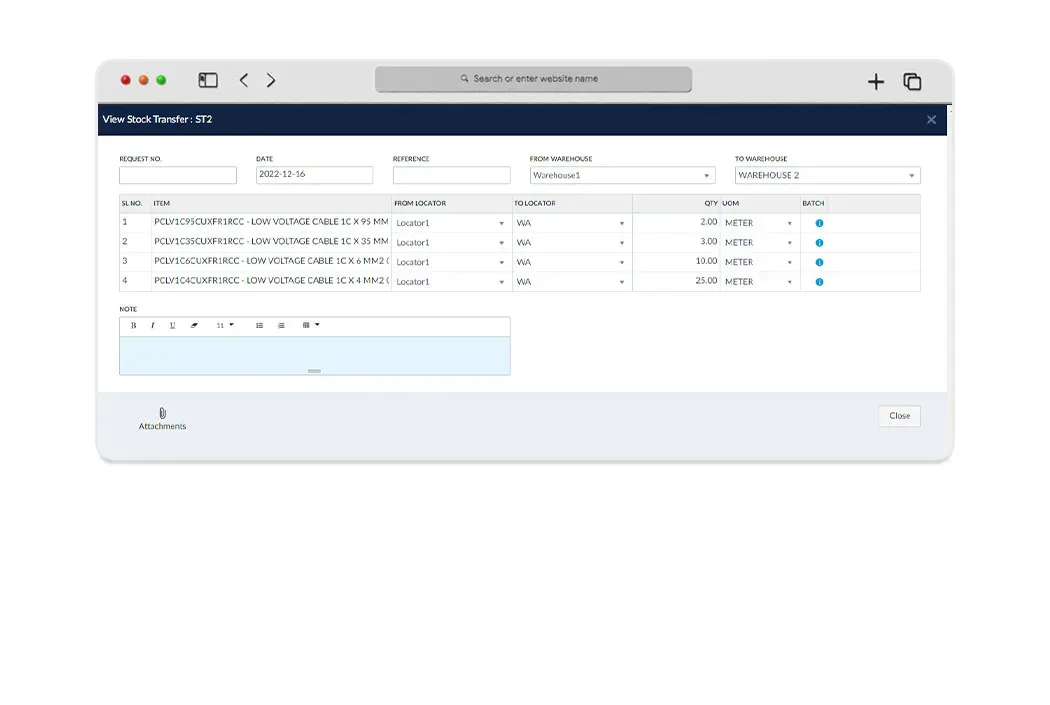
Stock Transfer & Adjustment
Have multiple warehouse/branch? Search for the stock levels at your other locations and easily transfer products from one warehouse to another while Tranquil automatically adjusts your stock value.
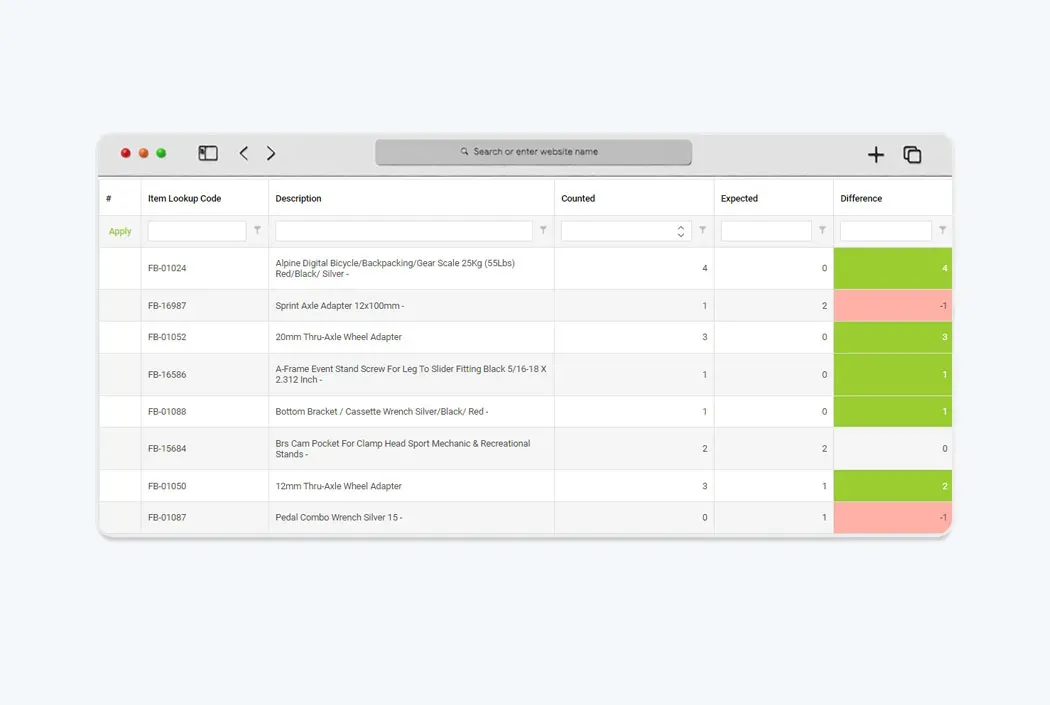
Stock Take
Quickly perform a full or partial stock takes, perform multiple counts simultaneously and merge it to a single file. Tranquil allows to use a compatible scanner to perform on-the-go stock takes on any device.
Multiple Warehouses
Manage location-specific inventory quantities, allocations and costs for multiple warehouses from a single platform.
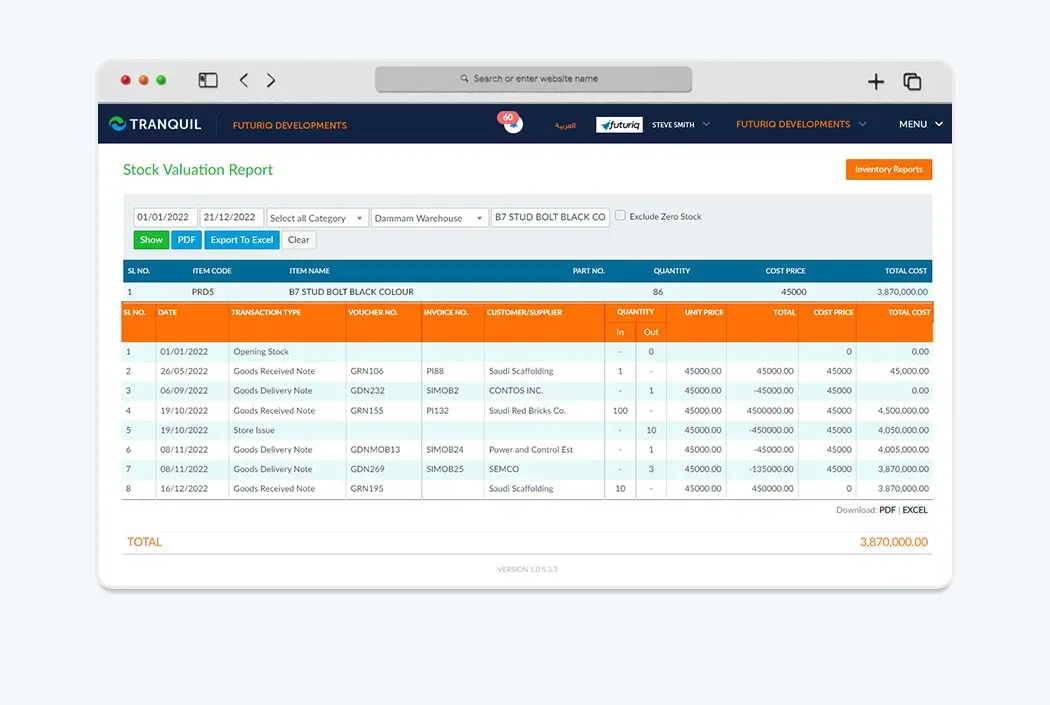
Precise Stock
Avoid product outages and lost sales. Track your inventory, orders, sales and deliveries from anywhere, anytime. Assign lot/location ID to items and track them across warehouses.
What does the software do?
Tranquil warehouse management software focuses on where stock is held, location-specific quantities, transfers, adjustments and stock takes. When a business operates a central warehouse, branches or work sites, an overall balance is not enough to decide which location should fulfil a request. Staff need to inspect availability at the relevant site before arranging a transfer or delivery. Existing features include multiple warehouses, item location identifiers, stock transfers with value updates, and full or partial counts.
A warehouse management system provides records to consult when quantities differ or delivery is delayed. A physical transfer and a count adjustment are different transactions, each with a reason and supporting record. Software does not remove the warehouse team’s responsibility for receiving, checking and entering goods promptly, and cannot guarantee error-free operations without clear procedures.
How does the workflow work?
Begin by defining warehouses and location identifiers, then review items and opening balances at each site. When goods arrive, record the quantity against the correct warehouse rather than an undifferentiated company total. Before transferring an item, check source availability and identify its destination. Record the movement and review both locations and the associated document.
For a stock take, select the warehouse, items or count scope, collect results and compare them with recorded balances. Multiple counts can be combined, with discrepancies reviewed before an adjustment is entered. If staff use barcode scanners, bring the device and item-labelling examples to the evaluation to check the count workflow. Review missing or unfinished movements rather than treating every discrepancy as a direct adjustment.
Who is it for?
The solution suits trading businesses holding goods for sale, distributors moving products from a warehouse to branches, and contractors monitoring materials at work sites. In manufacturing, material and finished-product location records help coordinate receiving and issuing with production teams. These are workflow examples, not a promise that every industry-specific process is enabled by default.
Agree who receives, counts and reviews discrepancies, and how a branch requests materials. Test a partial transfer, a count discrepancy and an item held in more than one location. These cases reveal the definitions, responsibilities and document controls needed for practical warehouse and branch management.
What should you review before choosing software?
Before adopting a warehouse system, review when staff record receipts and transfers and who confirms the destination quantity. For counts, assign responsibility for scope, results and discrepancy review. Missing movements or unclear units can create a difference without physical loss. Test selected items before extending the procedure to the whole warehouse.
Using the software in Saudi Arabia
Arabic and English interfaces help different teams work with the same warehouse records. When warehouse operations connect with accounting, the financial effect of movements can be reviewed in SAR according to business settings. A transfer between locations is not automatically a sales invoice in every situation; finance should determine the appropriate supporting financial document.
E-invoicing and VAT belong to the sales and accounting workflows and do not replace receiving and issue records. Review the applicable invoicing scope with Tranquil during implementation rather than assuming that creating a warehouse determines the tax treatment of every movement.
Connecting Tranquil modules
Warehouse management works with inventory for quantities and locations, purchasing at receipt, sales for delivery preparation, and accounting for movement costs. Contractors may need to discuss how site materials relate to projects, while manufacturers should review the material movements needed by their production workflow.
Start with one clear sequence: purchase order, warehouse receipt, branch transfer and issue for a sale or operational use. Walking through it shows how information passes between modules. Shared item and location definitions help avoid duplicate records, provided teams enter movements when they occur.
Request a Free Quote
We would be happy to show you our software and help you determine if Tranquil ERP is right for your business.
Contact UsFrequently Asked Questions
Can I manage more than one warehouse?
Yes. Manage multiple locations with site-specific quantities and costs. Define your warehouse and branch structure during setup.
Are inter-warehouse transfers recorded?
Yes. Record transfers between warehouses and review the resulting quantity and value updates.
Do I need a full count every time?
No. Full and partial stock takes are supported. Select the required scope and review differences before adjusting balances.
Can barcode scanners be used for counting?
The count workflow includes scanner use. Confirm your device and item labels in the demo rather than assuming every device is compatible.
How is warehouse management different from inventory?
Inventory focuses on items, quantities and costs; warehouse management focuses on their locations, transfers and counts. They work together within Tranquil.
What data should I prepare before setup?
Prepare locations, items, units and reconciled opening balances, plus transfer and count examples to establish your operating procedures.